
How to RUN Multiple Yahoo Messengers

Did you ever know, you can run only One Yahoo Messenger at a Time on your PC ( Try Now ) !
Here's the simple Trick to Edit your Registery and Enable the Multiple Yahoo Messengers.
- Go to Start > Run.
- In the Run box, type regedit and hit Enter
- Now, navigate to HKEY_CURRENT_USER > Software > Yahoo > Pager > Test.
- On the right side, right click , choose New > DWORD value.
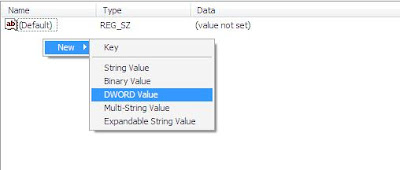
5. Rename it to plural

6. Double click on Plural and give 1 as Value Data

To Disable it, Follow the Same steps and just delete the plural Registery key

 Read More
Add your Comment
0
comments
Read More
Add your Comment
0
comments
Get Facebook's OLD Chat Interface Back

Everyone have Literally got Frustrated with the New chat interface by Facebook. The new facebook chat interface doesn't show your all Online friends.you need to search for each friend (Whether he/she is online or not)
Here the the two External scripts, which you can add into your browsers to get back the Old chat interface
Mozilla Firefox Users
Step 1: CLICK HERE and install the Firefox Add-on.
Step 2: CLICK HERE and Install the script.
Its Done.Give your browser a Restart and Enjoy :)
Google Chrome Users
No need to install the Add on.
CLICK HERE and Install the script.
Its Done.Give your browser a Restart and Enjoy :)
Both of them Didn't Work ?
CLICK HERE and get an Facebook's Pop Out Chat interface (Works like Old one)
If Anyone of above works out, Please Comment Below :)
Do Join Us on Facebook :)
Read More
Add your Comment
8
comments


