
Facebook COO Sheryl Sandberg meets Narendra Modi

Facebook Chief Operating Officer Sheryl Sandberg met Indian Prime minister Narendra Modi during her visit to India.
Its known that Narendra Modi is the 2nd highest followed politician on facebook with almost 18 million fans. He is 4th highest followed person on twitter as well with over 5 million followers. Narendra modi used Social media as his weapon during his loksabha election campaign to reach out to the youth, which pretty much contributed to his 300+ victory.
Soon after the meet, both Narendra Modi and Sheryl sandberg posted the photos on their facebook accounts respectively.

Sheryl Sandberg wrote :
"It was a privilege for me and my Facebook colleagues Marne Levine and Ankhi Das to meet with Prime Minister Narendra Modi today. The opportunity to be in India this past week has been special for me after beginning my career here on the World Bank’s India Health team 22 years ago.
Meeting Prime Minister Modi gave me the opportunity to express my personal appreciation to him for making the education of girls and women a priority as equal opportunity is essential for strengthening all economies and creating a just world. Exciting for our all-female delegation to #leanin with Prime Minister Modi.
We were glad to be able to congratulate him on his election, and on his unprecedented use of Facebook to connect with voters. He told us how he believes that direct communication with people all over the world is critical to effective governance and he plans to continue using Facebook and other social media to communicate with the people of India and the world. Digital diplomacy can change our national and international dialogues and that is why he plans to champion the free and open internet on the world stage.
India is important to the global economy, as well as to Facebook, and we look forward to working together on internet.org to bring the next billion people online. Access = opportunity – creating more economic, social and political opportunities for the people of India.
It was an honor to have this exchange and we look forward to ongoing collaboration".

 Read More
Add your Comment
0
comments
Read More
Add your Comment
0
comments
Social Media Week powered by Nokia on Feb 17-21

Social Media Week, partnering with Nokia, will explore what this all means on a global scale. In our sixth year of operation, reaching attendees in 26 cities, together with an online audience of 1M who connect via streaming video, social, and mobile experiences, The Future of Now will be our global focus for the next 12 months.
Social Media Week is scheduled to happen on Feb 17-21, 2014 where the SMW is giving you the chance to be the official reporter and fly down to New York and cover the entire event officially.
The Social media week would be celebrated in 8 major cities as Bangalore, Barcelona, Copenhagen, Hamburg, Lagos, Milan, New York, and Tokyo.
Akash Jain, Founder of Allrounder, has taken part in the #SMWReporter campaign showcasing the creativity, Love for Social media and the Social Media achievements in the video below. Do spread a word about it if you really love.
Incoming search : #smwreporter, smwreporter, social media week 2014
Read More
Add your Comment
0
comments
Join Facebook or Refer and get Rs.50 Talktime Free [Official]
Yes, you heard it correct. Facebook is officially offering a Rs.50 ($1) talktime to the new users and for each refferal as well. Once you register to the facebook with their new Refferal link and confirm the account, you get the talktime within 3 days.

This offer is applicable for the link http://m.facebook.com/tt .According to facebook, it takes 3 days to credit the talktime to the mobile.
It was reported that, about 83 Million facebook accounts are fake, and inorder to overcome, facebook has started this initiative to provide the Mobile number before the registration, so that the Genuineness shall me maintained.
If someone successfully registers through your refferal, you also get an Rs.50 talktime, which shall be credited in 3 days according to the website.
Read More
Add your Comment
1 comments
How To Remove Facebook Timeline and Get back the Old Profile
 |
Note : The Facebook Timeline can be Disabled-Removed-Deleted only for those, who enabled it before its public release, using Facebook Developers apps.
For others, there is no official way to remove Facebook timeline, as it has been made compulsary to all users.
After the Initial hype of the Facebook timeline, the over all feedback regarding the timeline has been negative and people are waiting the ways to remove it.
If you activated timeline using the facebook developers apps, you can follow the steps below
Steps to Remove the Facebook Timeline
Step 1 : Go to the Facebook Developers Page and click on the Edit App option

Step 2: On the Left side bottom, You have 'Delete App', Select that
Note : If you had added the App just for Facebook Timeline, Go ahead ! If you're a real Developer, deleting the app will be handy.


Finally, Confirming the Delete, The App and the Facebook Timeline will also be deleted from your profile.
Note : As facebook has been rolling out timeline for all profiles mandatorily, this method not work too !
Read More
Add your Comment
2
comments
Facebook Chat Tricks to get Mr Bean, Super Man & More
|
After our Top 25 Secret Facebook Smileys , here is another post, which is more cool, which produces some amazing faces inside the chatbox.
Just copy and paste the codes of the images into the chat box and press enter, and see the magic.
These smileys are no longer supported by Facebook now
Note: Copy and Paste the Exact code as it is in the chat box, and press Enter
1) Mr. Bean

Code:
[[255016264574238]] [[255016271240904]] [[255016277907570]]
[[255016267907571]] [[255016274574237]] [[255016384574226]]
[[255016387907559]] [[255016394574225]] [[255016401240891]]
[[255016391240892]] [[255016464574218]] [[255016454574219]]
[[255016457907552]] [[255016461240885]] [[255016451240886]]
[[255016537907544]] [[255016531240878]] [[255016534574211]]
[[255016541240877]] [[255016527907545]] [[255016634574201]]
2) The ELMO

[[302117289844540]] [[302117283177874]] [[302117276511208]] [[302117279844541]] [[302117286511207]] [[302117366511199]]
[[302117369844532]] [[302117373177865]] [[302117383177864]] [[302117379844531]] [[302117426511193]] [[302117436511192]]
[[302117429844526]] [[302117423177860]] [[302117433177859]] [[302117523177850]] [[302117529844516]] [[302117526511183]]
[[302117536511182]] [[302117533177849]] [[302117606511175]] [[302117596511176]] [[302117599844509]] [[302117593177843]]
[[302117603177842]] [[302117646511171]] [[302117649844504]] [[302117659844503]] [[302117656511170]] [[302117653177837]]
[[302117706511165]] [[302117703177832]] [[302117699844499]] [[302117709844498]] [[302117696511166]] [[302117749844494]]
3) Superman

Code:
[[299528860107644]] [[299528863440977]] [[299528866774310]] [[299528856774311]]
[[299528870107643]] [[299528950107635]] [[299528943440969]] [[299528946774302]]
[[299528953440968]] [[299528956774301]] [[299529013440962]] [[299529016774295]]
[[299529010107629]] [[299529003440963]] [[299529006774296]] [[299529060107624]]
[[299529063440957]] [[299529066774290]] [[299529070107623]] [[299529073440956]]
[[299529173440946]] [[299529183440945]] [[299529180107612]] [[299529176774279]]
[[299529186774278]] [[299529243440939]] [[299529236774273]] [[299529240107606]]
4) Jack Sparrow

Code:
[[298356520217565]] [[298356516884232]] [[298356506884233]] [[298356510217566]]
[[298356513550899]] [[298356620217555]] [[298356606884223]] [[298356616884222]]
[[298356610217556]] [[298356613550889]] [[298356673550883]] [[298356676884216]]
[[298356666884217]] [[298356680217549]] [[298356670217550]] [[298356740217543]]
[[298356733550877]] [[298356743550876]] [[298356730217544]] [[298356736884210]]
[[298356823550868]] [[298356810217536]] [[298356820217535]] [[298356826884201]]
[[298356813550869]] [[298356906884193]] [[298356896884194]] [[298356900217527]]
[[298356903550860]] [[298356893550861]] [[298356950217522]] [[298356946884189]]
5) The Mask

Code:
[[255006724575192]] [[255006727908525]] [[255006737908524]] [[255006734575191]] [[255006731241858]]
[[255006827908515]] [[255006831241848]] [[255006824575182]] [[255006817908516]] [[255006821241849]]
[[255006874575177]] [[255006871241844]] [[255006884575176]] [[255006877908510]] [[255006881241843]]
[[255006934575171]] [[255006931241838]] [[255006941241837]] [[255006944575170]] [[255006937908504]]
[[255007004575164]] [[255007001241831]] [[255006994575165]] [[255006997908498]] [[255006991241832]]
[[255007084575156]] [[255007101241821]] [[255007077908490]] [[255007091241822]] [[255007081241823]]
6) One Direction

Code:
[[282043668538164]] [[282043671871497]] [[282043675204830]] [[282043681871496]] [[282043678538163]] [[282043788538152]] [[282043801871484]]
[[282043791871485]] [[282043795204818]] [[282043798538151]] [[282043878538143]] [[282043888538142]] [[282043875204810]] [[282043885204809]]
[[282043881871476]] [[282043971871467]] [[282043978538133]] [[282043975204800]] [[282043981871466]] [[282043968538134]] [[282044075204790]]
[[282044078538123]] [[282044071871457]] [[282044085204789]] [[282044081871456]] [[282044178538113]] [[282044168538114]] [[282044171871447]]
[[282044175204780]] [[282044181871446]] [[282044281871436]] [[282044285204769]] [[282044278538103]] [[282044271871437]] [[282044275204770]]
7) Any Image in the Chat
You can add profile pic of anyone in the chats in small thumbnail size as shown in the pic below.

Code: [[username]]
Note: Replace the "username" with the username of the profile of which, you need the photo
Example:
Mark Zuckerberg: [[zuck]]
Lady Gaga : [[ladygaga]]
Allrounder : [[be.updated]]
8) Animated Text
You can type any text in the Animated form like the pic below
You can type any text in the Animated form like the pic below

Code for ALLROUNDER is :
[[107015582669715]] [[115807951764667]] [[115807951764667]] [[106699962703083]] [[116564658357124]] [[108634132504932]] [[112542438763744]] [[115430438474268]] [[106699962703083]]
You can Design your own Smileys using the following codes for Animated Symbols :
A [[107015582669715]]
B [[116067591741123]]
C [[115602405121532]]
D [[112542438763744]]
E [[115430438474268]]
F [[109225112442557]]
G [[111532845537326]]
H [[111356865552629]]
I [[109294689102123]]
J [[126362660720793]]
K [[116651741681944]]
L [[115807951764667]]
M [[106596672714242]]
N [[108634132504932]]
O [[116564658357124]]
P [[111669128857397]]
Q [[107061805996548]]
R [[106699962703083]]
S [[115927268419031]]
T [[112669162092780]]
U [[108983579135532]]
V [[107023745999320]]
W [[106678406038354]]
X [[116740548336581]]
Y [[112416755444217]]
Z [[165724910215]]
Read More
Add your Comment
20
comments
Get The Old Facebook Photo Style Back

Facebook recently upgraded its photo Album style to a new one, which in return is disliked by many of the users.You can get back to the old style of the photo album with the following trick.
The New Photo Album Style :
The new photo album style has the entire background shaded off with just the image appearing.
Few more options like Rotate Left and Rotate Right are given for the Photo owners.
The Options, Comment section has been shifted to the right side, from the bottom, which in result, will decrease the width of the image.

Steps to get Old style Back
Trick 1 : When the Photo is opened with the new style, go to the url of the image (See the pic above), search for the &theater, just remove it from the url and press Enter
Trick 2 : Just Refresh the Page or press F5 (See the circled part in the Image)
Trick 3 : Just Open the photos in the new tab, by Right clicking on it and selecting Open in new tab
And the same photo will be in the old style back

Do Like this and Share with your friends.
Read More
Add your Comment
3
comments
Dr. A.P.J Abdul Kalam is Officially on Facebook now !

The Page's about part says : "This social networking page will closely follow my travels, experiences and will update it with new ideas for the youth of the nation to connect and evolve."
 |
| Mr. APJ Abdul Kalam, Logged into Facebook ! :) |
The Official Page Info :

Connect to the Official Page of Mr.APJ Abdul Kalam here :
Read More
Add your Comment
16
comments
13 Attractive Facebook Timeline Covers to your profile
|
Did you check ?
The 2013 New Facebook Chat Smileys
It has been over a month since Facebook officially announced about the release of their new Timeline profile. If you are still using the old Facebook profiles its time to update to newly released Facebook Timeline profile. There is an awesome feature integrated in newly released Facebook Timeline profile of adding covers to your Timeline. Everyone likes to have their unique Timeline cover on their profile.
Features of using unique Facebook Timeline cover:
- You will be different from others.
- Everyone will start following you including your friends.
- No need to Photoshop the one's provided below are unique.
- There is no logo on them to say that you have copied it from our blog.
- If you feel that there is a thing missing in them you can still make a minor edit in them.
Here are some 13 Awesome unique Timeline covers which you can add to your profile for free. Click on the image to enlarge.
To download these Timeline covers,right click on image and click on Save Image as' and 'Save'.
Facebook Timeline Covers:
1. 'Addicted to Facebook' Timeline cover.

2. 'This Guy Rocks' Timeline cover.

3. 'Cover is under construction' Timeline cover.

4. 'Cover is loading' Timeline cover.

5. 'Awesome' Timeline cover.

6. '404 Error' Timeline cover.

7. 'Be Water My Friend' Timeline cover.

8. 'Hacker' Timeline cover.

9. 'Funny Finger' Timeline cover.
.jpg)
10. 'Wasted Space' Timeline cover.

11. 'Evolution of man to Geek' Timeline cover.

12. Four type of People

13. Advertising Cover page

Note: These images are collected over internet.Any one claiming the copyright issues can contact at akash207[at]gmail.com
Incoming search terms : facebook timeline cover, cover image for facebook,cover image fb, fb cover download,best facebook cover image, super facebook cover image, facebook timeline cover photo,cover photo facebook timeline, friends cover image facebook,love cover image facebook,dude
This is a guest post by Arpith. He is an effective writer who writes for Crazyinternet.org about Social Networking, Computers and Internet.
Read More
Add your Comment
8
comments
Use Facebook without internet on your Basic Mobile Handset !

.
'FoneTwish', in Facebook Application has enabled the Non Internet Based Mobile Handsets also to use Facebook in it !
How to use it ?

Just Dial *325# from your Handsets and
have the Facebook menu popped up on your screen
Initially, it will ask for your Facebook Email Id and password. Once you login, you can use it.
What all Features can be Used ?
 -News Feeds
-Notifications
-Update Status
-Wall Posts
-Manage Friends
-Chat
-Birthday Reminders
What are the Charges ?
-Updating Status is Completely Free, but to use other Features like Posting on wall, Checking Notifications, Adding Friends are Not Free.
-Facebook by Fonetwish is a subscription service that charges just Rs. 1/ day for unlimited usage.
-There is no charge for Dialling the Number *325# . You can freely see the options :)
Which Phones and Networks does it support ?
Its designed to support all mobile phones ranging from Nokia 3100 to all Blackberries and iPhones
Currently, In India, Its compatible with Airtel, Aircel, Idea, Videocon, Loop and Tata Docomo.
Video Tutorial and Official Links
You can find more information about fonetwish here
Read More
Add your Comment
5
comments
Microsoft Launches SO.CL saying it as a Social Networking for Students

After the Google, and Facebook into the Social Networkings, Microsoft looks as they have entered partially in it.Recently they Launched the site SO.CL (called as 'Social') which at first looks like an 'Social Networking + something'.
The site looks as in Trial Version, with an Inbuilt application which signs you through Facebook. As of now, New registrations have to wait as it shows 'Over Capacity'. They have an Invite system as of now for the registration. (We've giving away few free Invites too)
Microsoft Speaks
According to a post on Microsoft Research :"So.cl has been designed for students studying social media “to extend their educational experience and rethink how they learn and communicate,” which, indeed, sounds very experimental. "
The site looks completely empty as of now with just few Features like video chatting called as 'Video Party', and normal posting and commenting.
The Small Video which speaks, 'What is So.cl' !
SO.CL - The Video Speaks
Things Missing :
1. No @replies
2. No Private messages
3. No Picture album
4. No ":)" option in comment section though ":)" is there under post.
5. No Gaming zone
6. No 3rd party Application associations
We'l have to wait to know, what Microsoft people are Upto :P
Free SO.CL Invites Give Away
To Claim the Free SO.CL Invites, Follow the steps below :
Like / Share :
Tweet : Tweet
Drop Down your Email Id's in the comment box.
Few Lucky one's will get the Invites on your E-mails :)
-If you're already on so.cl, Do Follow me Here
Read More
Add your Comment
5
comments
How to RUN Multiple Yahoo Messengers

Did you ever know, you can run only One Yahoo Messenger at a Time on your PC ( Try Now ) !
Here's the simple Trick to Edit your Registery and Enable the Multiple Yahoo Messengers.
- Go to Start > Run.
- In the Run box, type regedit and hit Enter
- Now, navigate to HKEY_CURRENT_USER > Software > Yahoo > Pager > Test.
- On the right side, right click , choose New > DWORD value.
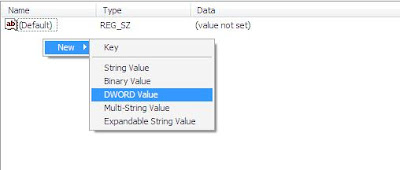
5. Rename it to plural

6. Double click on Plural and give 1 as Value Data

To Disable it, Follow the Same steps and just delete the plural Registery key
Read More
Add your Comment
0
comments
5 Days of Facebook [Facebook Relationship Video]
The Indian Video which Goes VIRAL on Facebook !
"5 Days of Facebook", is a Small Movie speaking about A Boy & Girl, who met each other after long time, on Facebook. Its about the Guy's Expectations & Reality.
This Video has gone Viral, all over the Facebook, and to feel proud, its an Indian Video !
I Suggest you to see this video, Its an 'MUST WATCH' :)
------------------------------------------------------------------------------------------------
JOIN US ON FACEBOOK
If you LIKE this,SHARE with Others, If you don't like,SHARE with US :)
Read More
Add your Comment
4
comments
Enable the Facebook Timeline in couple of Minutes

Facebook launched its 'Timeline" view of the profile, but as a part of testing, they made it available only to the Facebook developers !
The official Launch of timeline may take some more time.This tutorial will make you a 'Facebook Developer' and then you'l be having the TIMELINE in couple of minutes.
This is how Timeline will look
This is My Timeline view of Facebook

Steps to Enable TIMELINE
1. Login to your Facebook account.
Note: CLICK HERE and Verify your Mobile phone before proceeding (If already done, Proceed)
2. CLICK HERE and go to Facebook Developers Page

3. Allow the Facebook developers app to be added (See the pic above)
4. Click on Create a New App.
5. Give the App name and namespace such that its Available, and then agree to the Policies and click on continue
6. Now, Your App must be visible on the App's main screen
7. Look for the “Open Graph” header, and click the “Get Started using open graph” link.

8. Create an action like read a book and click on Get started.
9. Wait for couple of minutes and go back to Facebook home screen.
10. An Facebook Timeline Invititation must be waiting on top of your home screen
And its Done ! Accept the Invitation and start Enjoying the New Timeline view :)
And its Done ! Accept the Invitation and start Enjoying the New Timeline view :)
------------------------------------------------------------
Like US on Facebook :)
If you LIKE this,SHARE with Others, If you don't like,SHARE with US :)
Read More
Add your Comment
3
comments


